
Proxmox VE became the default free answer to Broadcom's VMware licensing change. ZSvirt, open-sourced under GPL 3.0 on 12 August 2026, is a second free KVM option. Here is how the two compare on operations, scale, scheduling and VMware migration.
This post first appeared on the ZSvirt blog.
After Broadcom ended perpetual licensing for VMware vSphere at the end of 2023, many teams chose Proxmox VE (PVE for short). For the two years that followed, Proxmox became the mainstay of the free, KVM-based mid-market.
On 12 August 2026, ZSvirt — launched by infrastructure vendor ZStack — announced it was open-sourced under GPL 3.0. For a lot of teams, that adds another option among open-source virtualization platforms.
ZSvirt is an enterprise-focused open-source virtualization platform, and against Proxmox it differs in target users, use cases and development path.
Versions compared:
- ZSvirt 1.0.0 — released 2026-08-12
- Proxmox VE 9.2 — x86-64 released 2026-05-21, arm64 released 2026-08-05
This article is published by the ZSvirt project, so read the ZSvirt claims accordingly. ZSvirt’s own capabilities are taken from its public documentation and its published comparison testing; Proxmox VE figures come from Proxmox’s official documentation. Vendor-run comparisons are a starting point, not independent verification — reproduce the ones that matter to you in your own lab. Every external figure carries an inline source.
1. What Are ZSvirt and Proxmox VE?
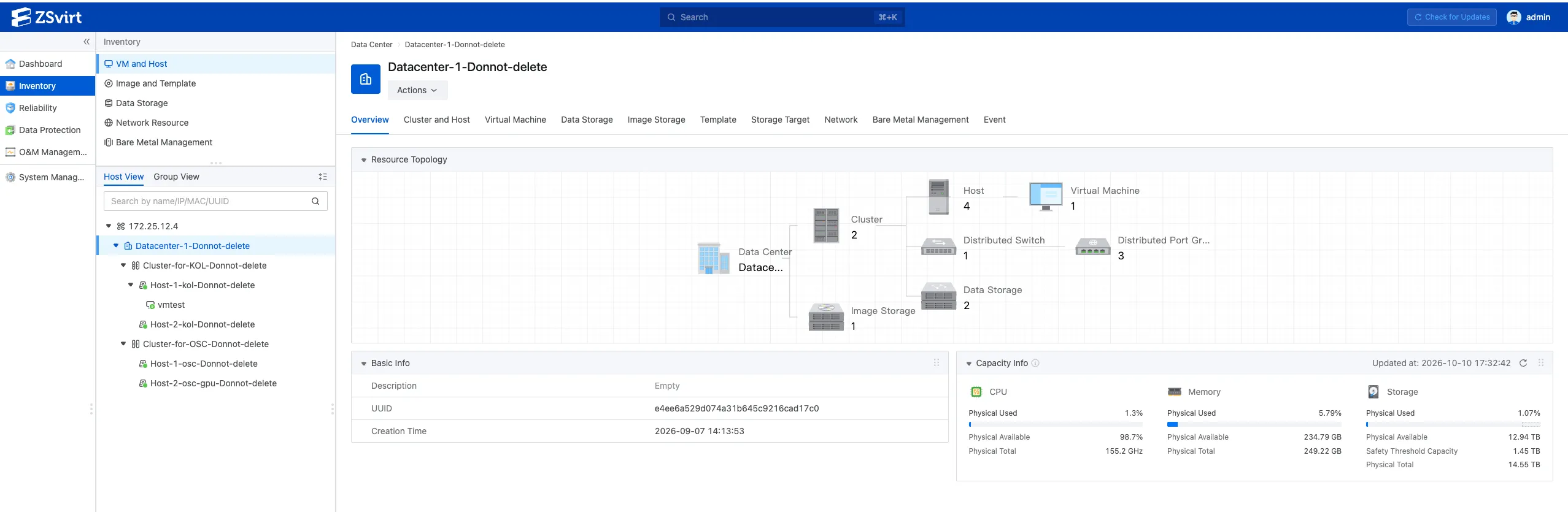
Both are open-source virtual machine platforms built on KVM, each with built-in web management that lets any node manage the cluster without a separate management appliance to deploy. They come from opposite directions, which comes down to one line:
- ZSvirt: starts from mature enterprise virtualization technology and reaches global users and use cases through open source.
- Proxmox VE: starts from the open-source community and homelabs, and works its way up to enterprise use through continuous iteration.
| ZSvirt | PVE | |
|---|---|---|
| Base | KVM | KVM + LXC |
| Origin | ZStack’s commercial platform ZSphere | Maintained by Proxmox Server Solutions |
| License | GPL 3.0 | AGPL 3.0 |
| Community edition | Full feature set, free to download for production, no license fee | Full feature set, free ISO download |
| Control plane | A single control plane managing multiple datacenters and clusters | Cluster membership via corosync; multi-cluster management needs PDM 1.1 on top |
2. What Do the Two Platforms Have in Common?
Both ZSvirt and PVE are built on KVM, and both support the same baseline capabilities:
| Capability | ZSvirt | PVE |
|---|---|---|
| Hypervisor | KVM | KVM |
| High availability | Built into the Community Edition | PVE HA, corosync-based |
| Live migration | Between nodes | Between same-architecture nodes |
| Snapshots | Yes | Yes |
| Backup | Built in | vzdump and PBS |
| Web management | Built-in, any node can manage the cluster | Built-in, any node can manage the cluster |
| Distributed storage | Supported | Ceph built in |
| Templates and clones | Supported | Supported |
| Automation and orchestration | API-driven and CLI management | API-driven and CLI management |
If a team’s needs stop at managing a few nodes, high availability, snapshots, backups and a web UI, both platforms deliver for free. The difference is in how each packages those capabilities into a product for the user’s scenario.
3. How Do Day-to-Day VM Operations Differ?
Day-to-day VM operations are the most basic and most visible difference between the two. Every feature below is based on ZSvirt/ZSphere and Proxmox VE public material and compared through side-by-side functional testing.
| Operation | ZSvirt | PVE |
|---|---|---|
| ISO library | Centralized and platform-wide. Upload once, available to every host | Local to each node by default; re-upload per node unless shared storage is configured |
| OVF import | GUI wizard; name and network set in the same flow | CLI (qm importovf); needs shell access, manual network/BIOS setup, and the file copied to the node first |
| OVA export | Native GUI export | No native OVA export |
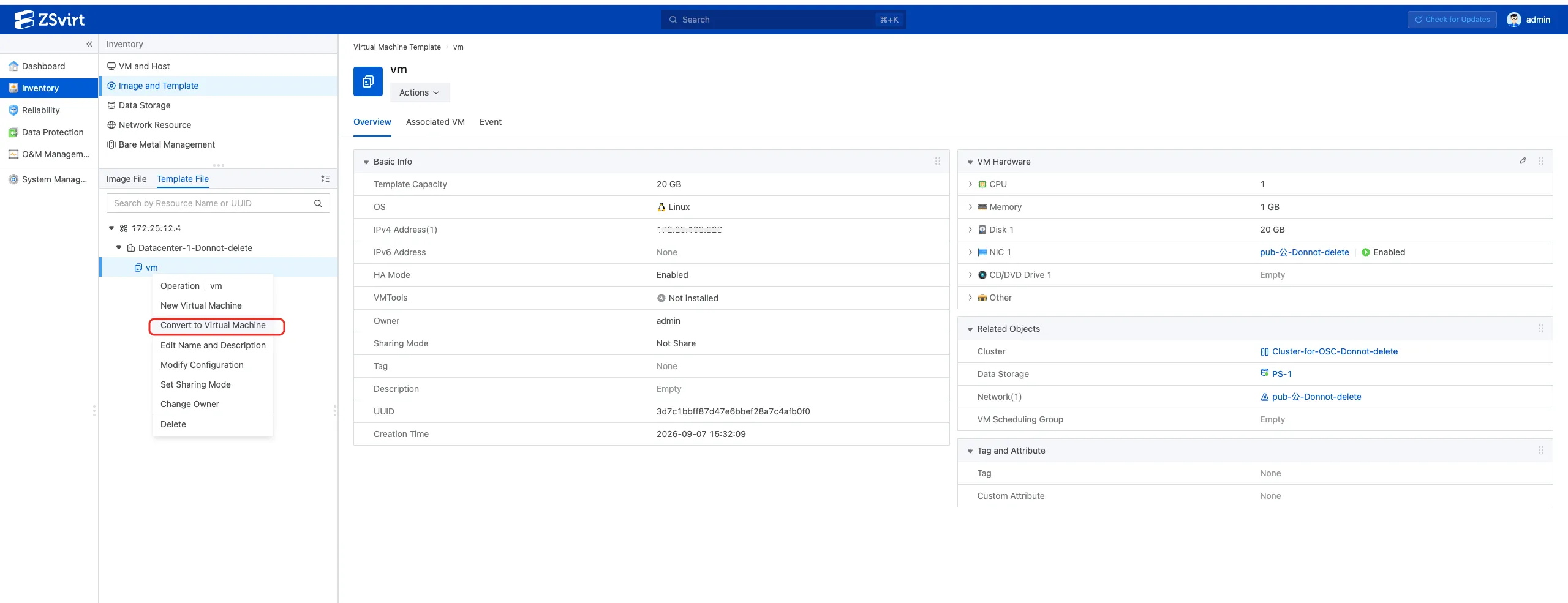
| Template ↔ VM | Bidirectional; a template can be converted back to a VM | One-way in the GUI; the CLI qm set <vmid> --template 0 can reverse it |
| Clone a running VM to a template | Yes | No. Clone first, then convert the clone |
| Batch VMs from a template | Quantity field | One clone produces one VM |
| Recycle bin | VMs and detached disks are recoverable before expunging | No recycle bin; a detached disk becomes an “Unused Disk” that can still be reassigned |
| IP at creation | Assign DHCP or a static IP in the wizard | Not at creation; set in the guest OS or via cloud-init (cloud-init images only) |
| Change IP on a running VM | GUI, without touching the guest OS | Guest OS only; cloud-init re-apply usually needs a reboot |
| Security group at creation | Bound during VM creation | Create the VM first, then assign |
| vNUMA | Guided “Smart Binding” wizard, topology viewer, and a migration-safety check | A single NUMA checkbox |
| Failure strategy | Configurable error policy, e.g. restart on a kernel panic | No failure strategy; a frozen VM can still be reported as running |
| Disk resize | Live resize, without stopping the VM | Live resize, without stopping the VM |
| Detach disk | Detach while the VM is running | Detach while the VM is running |
| Hibernate | Not available | Supported (qm suspend --todisk) |
| VM views | Host and group views | Server, folder, pool and tag views |
Two things stand out for anyone evaluating these features.
- Several of ZSvirt’s advantages are about not having to use the command line: OVA export, OVF import, online IP changes, batch deployment from a template and a guided vNUMA workflow are all GUI operations on ZSvirt, where on PVE they need the CLI, manual configuration or a third-party tool.
- PVE supports VM hibernate, for which ZSvirt has no equivalent.
4. How Do They Scale, and How Does Scheduling Compare?
Scale and scheduling are where the two platforms’ design philosophies are furthest apart, and where the choice matters most.
On scale, Proxmox VE uses corosync to keep cluster state consistent — a synchronous protocol every node participates in, and one that is highly sensitive to network latency. On cluster size, the official documentation states plainly, “There’s no explicit limit for the number of nodes in a cluster.” In practice, though, PVE clusters are normally kept under about 20 nodes, and a dedicated, isolated corosync network is required, because the more nodes there are, the more corosync’s latency sensitivity becomes a real problem. Past that, the standard approach is to run several small clusters and aggregate them with Proxmox Datacenter Manager, whose enterprise repository requires a Basic subscription or above.
ZSvirt’s design separates the management-node and compute-node roles. Management nodes can manage datacenters hierarchically, from cluster down to host, so a single control plane is specified to manage 10,000+ hosts. That is a cross-cluster management scale and a different dimension from PVE’s per-cluster practical limit, and it is why ZSvirt is better suited to enterprise datacenter management.
On scheduling, to match VMware’s DRS, Proxmox VE 9.2 added Cluster Resource Scheduling with escalating modes — Basic (the default, which counts guests rather than measuring load), Static Load (configured quotas) and Dynamic Load (live CPU and memory usage). In Dynamic mode, the approach is genuinely equivalent to a load-based scheduler like ZSvirt’s DRS. The caveats are what matter: balancing is opt-in, the dynamic mode acts on HA-managed guests, and the default mode is still count-based.
ZSvirt offers scheduling models for a range of scenarios, including VM scheduling groups, HA policies, VM startup policies and load-based DRS, and it balances on live CPU and memory thresholds across the cluster, with a recommendation history and configurable triggers.
| Scheduling | ZSvirt DRS | PVE CRS |
|---|---|---|
| Modes | Automatic or manual load balancing | Basic (default), Static Load, Dynamic Load |
| Decision basis | Live CPU and memory thresholds | Basic counts guests; Dynamic uses live usage |
| Tunables | Configurable triggers | Imbalance threshold %, hold duration, minimum improvement % |
| Coverage | All guests in the cluster | Dynamic mode balances HA-managed guests; balancing is opt-in |
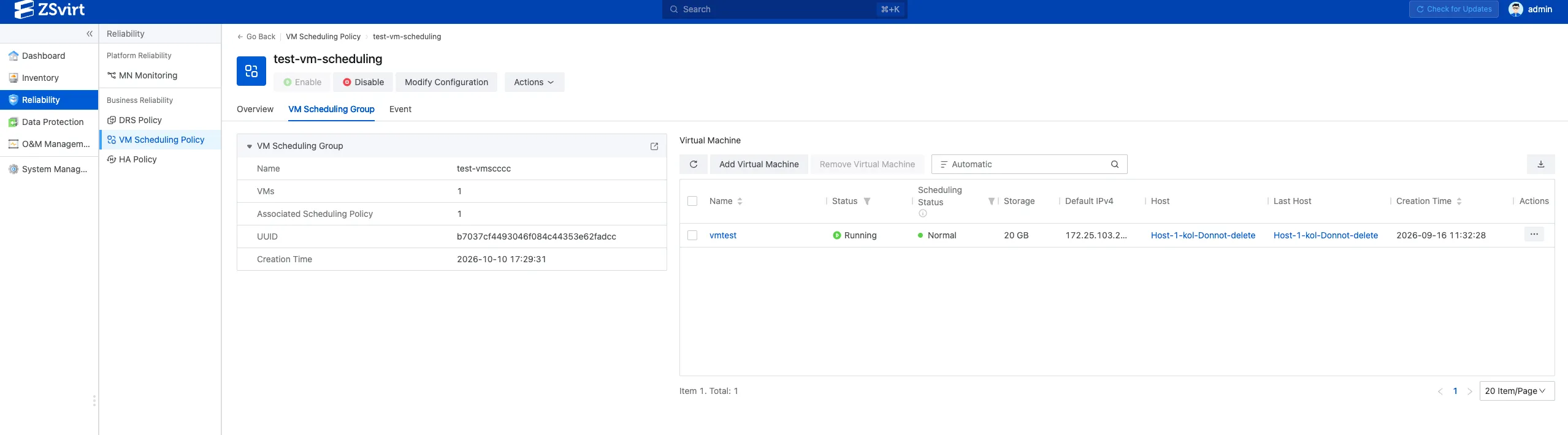
In practice, ZSvirt’s scheduling is designed at cluster and datacenter granularity, with multiple policies for different scenarios, which suits batch and large-scale deployments; PVE splits into multiple clusters aggregated with PDM, and its scheduling policies are relatively limited.
5. How Do You Migrate from VMware?
Both platforms ship a migration path from VMware, and the difference is in how much of it is agentless and how much you have to drive by hand.
Proxmox VE has a built-in official ESXi import tool (added in 8.2), tested against ESXi 6.5–8.0, with live-import support. The official wiki documents the boundaries: disks on vSAN are not supported, encrypted disks cannot be imported, vTPM state cannot be migrated (note this for Windows 11 VMs), imports of VMs with snapshots are markedly slower, and serial imports are recommended over parallel ones. The recurring pitfalls are elsewhere: Windows VMs boot only from IDE/SATA by default until VirtIO drivers are installed, VMware Tools must be uninstalled before the move rather than after, and mixed CPU instruction sets across hosts will break a migration if they are not checked first.
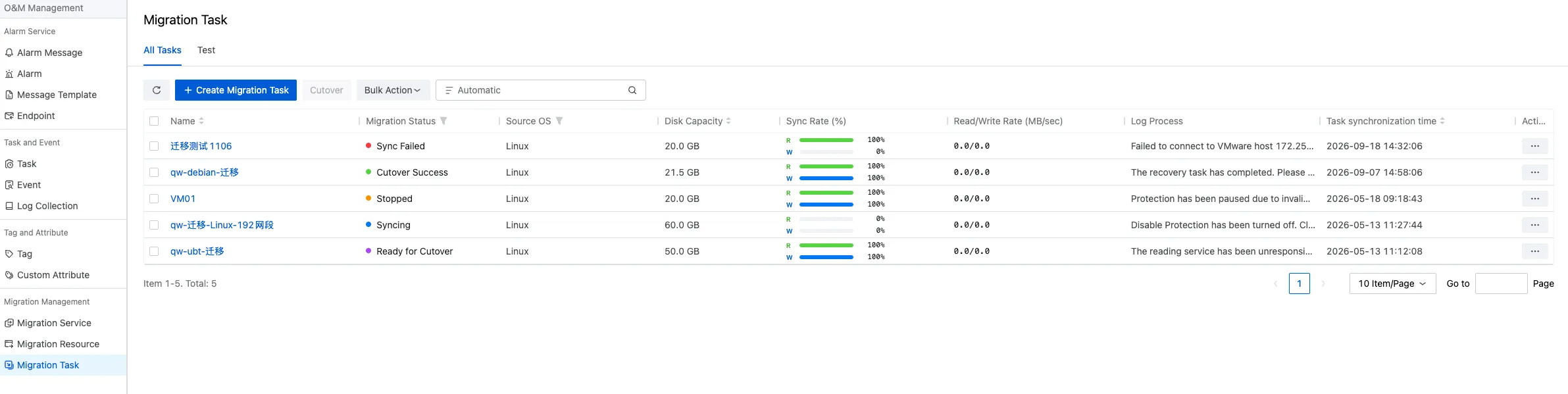
ZSvirt’s migration tool is ZMigrate (agentless), covering both online migration and offline import, with a documented workflow for each. The offline path has no scale limit; the online path does, so large estates are usually moved in waves.
As with any VMware migration, inventorying the hidden dependencies matters more than the cutover itself — backup scripts, monitoring probes, automation that calls vSphere APIs, uninstalling VMware Tools, and installing drivers.
| VMware migration | ZSvirt | PVE |
|---|---|---|
| Tool | ZMigrate, agentless | Built-in ESXi import tool (from 8.2) |
| Modes | Online migration and offline import | Offline import, tested against ESXi 6.5–8.0 |
| Characteristics | Fully automated migration and cutover | Manual handling of VMware Tools and VirtIO drivers |
6. How Do Automation, Security and Support Compare?
On automation, ZSvirt exposes 2,000+ REST/OpenAPI endpoints with a native Terraform provider and Go, Python and Java SDKs, all in the Community Edition. PVE also provides a REST API and a well-known community Terraform provider, but no vendor-maintained Terraform provider of its own.
On security, ZSvirt ships Secure Boot, vTPM 2.0, VM encryption, security-group micro-segmentation and immutable audit logs in the Community Edition. PVE provides Secure Boot through OVMF, supports TPM state, and has a firewall that operates at the datacenter, node and VM levels; micro-segmentation and a broader security stack are things you assemble from its SDN and firewall features.
One practical difference from the functional testing is anti-spoofing: ZSvirt exposes it as a single toggle, while on PVE it requires enabling the firewall at datacenter, node and VM levels and opening the default DROP policy for corosync and management traffic first. ZSvirt ships its own backup module, with multiple backup and retention policies, whereas PVE needs Proxmox Backup Server layered on top to provide backup.
On support, PVE has a large community forum and a tiered subscription with tickets, currently on European business hours, moving to 24/7 for Standard and Premium during 2026.
ZSvirt’s community runs through GitHub and Discord, with a commercial edition for teams that need vendor support.
| ZSvirt | PVE | |
|---|---|---|
| Automation | 2,000+ REST/OpenAPI endpoints; native Terraform provider; Go/Python/Java SDKs | REST API; community Terraform provider (no vendor one) |
| Security | Secure Boot, vTPM 2.0, VM encryption, security-group micro-segmentation, immutable audit logs | Secure Boot (OVMF), TPM state, datacenter/node/VM firewall, SDN |
| Backup | Third-party support (Veeam, Commvault, Veritas) | vzdump and PBS; broad third-party support (Veeam, Commvault, NAKIVO) |
| Support | Community (GitHub, Discord); commercial edition available | Community forum; subscription tickets (EU hours, 24/7 during 2026) |
7. How Do You Choose Between Them?
Neither platform is a universal answer, and the right call depends on where you sit on scale, ecosystem and what you need from the feature set.
| Scenario | ZSvirt | PVE | Assessment |
|---|---|---|---|
| Homelab | Workable (no-install demo lowers the trial cost) | Strong | PVE is still the default for learning: a huge community and a direct ISO download |
| Small production cluster (3–20 nodes) | Strong | Strong | Both work. ZSvirt has more complete packaging for enterprise scenarios and is more fully productized |
| Large or multi-cluster estates (100s of hosts) | Strong | Split clusters aggregated with PDM | Past a few dozen nodes, ZSvirt’s control plane is designed for that scale, with more efficient and flexible multi-cluster scheduling; PVE needs PDM layered on top |
| VMware migration at scale | Strong (ZMigrate, agentless) | Workable (built-in import, with vSAN/encryption/vTPM limits) | Agentless migration is faster to run; either way, inventory hidden dependencies first |
| Third-party backup | Strong (Veeam, Commvault, Veritas) | Strong (Veeam, Commvault, Veritas) | Both support commercial backup software |
Three judgments to close on:
- Neither is a drop-in replacement for the other. Both are free, both run KVM, and both will run most VMware workloads after migration. Proxmox VE has a more complete community ecosystem, and much of its install base still comes from homelabs and enterprise test environments; ZSvirt builds in productized operations capabilities and focuses more on large-scale cluster management and enterprise scenarios.
- Both are mature products, but they took different routes. Proxmox VE follows an open-source community route, with a broad base of community enthusiasts and community support, and has been strengthening its enterprise product and service capabilities over the past two years. ZSvirt began on a commercial enterprise route and open-sourced in August 2026, opening up capabilities accumulated over ten years of production practice to lower the barrier to entry and offer more transparent technology and broader community collaboration, in order to grow its users and ecosystem.
- Both are cheap to test, so test. The cost of finding out whether either fits is close to zero. ZSvirt has a no-install online demo, a step-by-step quick start, and qcow2/OVA images that run on any machine supporting nested virtualization; Proxmox VE is a single ISO. Whether a platform fits is better settled by a test run than by any vendor’s comparison, this one included.
Frequently Asked Questions
Is ZSvirt free? Yes. The Community Edition is free for production use with no license fee, is licensed under GPL 3.0, and includes the full feature set — HA, DRS, snapshots, backup, templates and the REST API.
Is Proxmox VE free? Yes. The free tier has the full feature set, and the ISO downloads directly from the Proxmox site. The official FAQ confirms that features are not limited by subscription level.
Does Proxmox VE have a DRS equivalent? Partly. Proxmox VE 9.2 introduced Cluster Resource Scheduling with dynamic load balancing, whose approach is genuinely equivalent to a load-based scheduler. But it is opt-in, it acts on HA-managed guests, and the default mode counts machines rather than measuring load. ZSvirt’s DRS ships in the Community Edition and balances on live CPU and memory thresholds.
Can one tool manage both large ZSvirt and Proxmox VE estates? For ZSvirt, a single control plane is specified to manage 10,000+ hosts. Proxmox VE manages a single cluster, and multi-cluster management requires Proxmox Datacenter Manager, whose enterprise repository needs a Basic subscription or above.
How do you migrate from VMware to ZSvirt? Through ZMigrate, which is agentless and supports online migration and offline import. Online migration has scale limits; offline import does not.
This article is written by the ZSvirt project. ZSvirt’s capabilities come from its public documentation and published comparison testing; Proxmox VE figures come from its official documentation and other public material. A comparison like this is a starting point — a real selection decision still calls for testing in your own environment.
Sources
- ZSvirt is open source — ZSvirt
- ZMigrate workflow walkthrough — ZSvirt
- ZSvirt quick start: deploy your first VM — ZSvirt
- ZSvirt documentation — docs.zsvirt.io
- ZSvirt source code — GitHub
- Proxmox Virtual Environment FAQ — Proxmox
- Proxmox Virtual Environment 9.2 released — Proxmox
- Proxmox VE official ARM64 support — Proxmox
- Cluster Manager (node limits and corosync requirements) — Proxmox VE documentation
- Migrate to Proxmox VE — Proxmox Wiki
- Proxmox Datacenter Manager roadmap — Proxmox Wiki
- qm manual (suspend and hibernate) — Proxmox VE documentation
- Terraform provider for Proxmox VE — bpg (community)
Join the Community
- Issue reports: GitHub Issues
- Community discussions: GitHub Discussions
- Social media:
- YouTube: https://youtube.com/@ZSvirt
- LinkedIn: https://www.linkedin.com/in/zsvirt-community/
- X/Twitter: https://x.com/ZSvirt
- Discord: https://discord.com/invite/KHsw63z9xA
- Email: community@zsvirt.io


